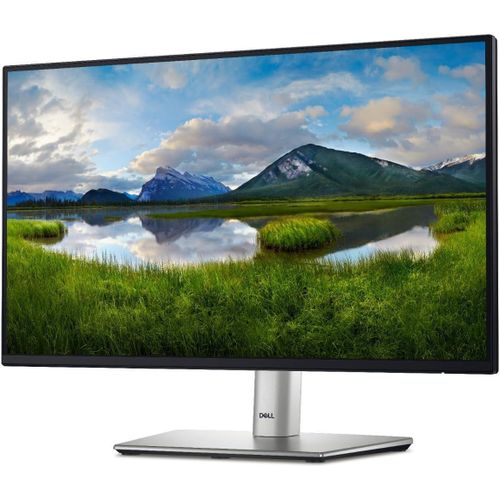
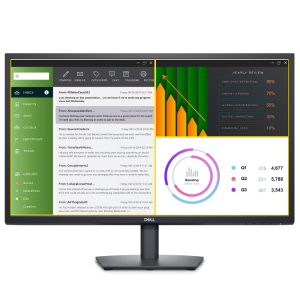
Dell P2725HE 27″ FHD USB-C Hub Monitor: Ultimate 100Hz Productivity Dock
The Dell P2725HE 27″ FHD USB-C Hub Monitor transforms any workspace into a fully connected command center with single-cable 90W charging, 100Hz refresh rate, integrated Ethernet, and daisy-chain capability. This professional IPS display with ComfortView Plus and full ergonomic stand is built for Kenyan corporate, hybrid, and power users who demand zero cable clutter and all-day comfort.
Detailed Use Cases for Dell P2725HE 27″ FHD USB-C Hub Monitor
Single-Cable Corporate Docking
Professionals connect just one USB-C cable to their laptop and instantly get:
- Crisp 1920×1080 @ 100Hz video
- 90W power delivery (full charge for Dell Latitude, XPS, Precision, and most USB-C laptops)
- Gigabit Ethernet
- Keyboard, mouse, external drive, and phone via four downstream USB ports
- Second monitor via DisplayPort-out MST
No docking station needed — ever.
Hybrid & Hot-Desk Workstations
Remote workers arrive, plug in one cable, and are fully operational in seconds. Hot-desk users share monitors without reconfiguring peripherals. IT teams reduce support tickets with standardized single-cable deployment.
Multi-Monitor Productivity Arrays
Finance, analytics, and creative teams daisy-chain two or three P2725HE monitors via DP-out MST using only one laptop port. Each monitor retains full USB hub and Ethernet functionality. Micro-edge bezels create near-seamless extended desktops.
Video Conferencing & Collaboration
Managers host Teams or Zoom calls with smooth at 100Hz. ComfortView Plus reduces eye strain during back-to-back meetings. Built-in RJ45 ensures stable wired connection when Wi-Fi is unreliable.
IT & Server Room Management
Administrators connect crash carts with full KVM functionality. USB-C upstream + downstream ports allow control of multiple systems from one keyboard/mouse. Gigabit Ethernet supports remote management tools.
Compatibility with Every Modern Device
The Dell P2725HE 27″ FHD USB-C Hub Monitor works perfectly with:
- Dell Latitude, XPS, Precision, Inspiron (90W PD)
- HP EliteBook, ProBook, ZBook
- Lenovo ThinkPad X1, T, P series
- MacBook Pro/Air M1–M3 (90W PD + full resolution)
- Surface Laptop/Pro
Explore compatible laptops at Novatech Technologies’ laptops category. Pair with OptiPlex, Precision, or custom desktops from Novatech Technologies’ desktops category. Visit our full store at Novatech Technologies.
Technical Specifications of Dell P2725HE 27″ FHD USB-C Hub Monitor
Display Performance
- Screen Size: 27 inches diagonal
- Panel Type: IPS with LED backlight
- Resolution: 1920 × 1080 Full HD @ 100 Hz
- Brightness: 300 cd/m²
- Contrast Ratio: 1000:1
- Response Time: 5 ms (GtG fast mode)
- Color Coverage: 99% sRGB
- Viewing Angles: 178° / 178°
Full Connectivity & Docking
- Video In: 1× HDMI 1.4, 1× DisplayPort 1.4
- Video Out: 1× DisplayPort 1.4 (MST)
- Network: 1× RJ45 Gigabit Ethernet
- USB-C: 1× USB-C 3.2 Gen1 upstream (90W PD + DP Alt Mode + data)
- USB-A: 3× USB 3.2 Gen1 downstream (5 Gbps)
- USB-C Down: 1× USB-C downstream (15W charging, data only)
Ergonomic Stand
- Adjustments: Height 150mm, tilt -5°/+21°, swivel ±45°, pivot 90°
- VESA: 100 × 100 mm
Health & Sustainability
- ComfortView Plus (always-on low blue light)
- Flicker-free
- TCO Certified Edge, EPEAT Gold, ENERGY STAR
Why Trust Novatech for Your Dell P2725HE 27″ FHD USB-C Hub Monitor
Novatech Technologies is Kenya’s Dell Platinum Partner. Every Dell P2725HE includes official 1-year Next-Business-Day onsite warranty (extendable to 3–5 years ProSupport). Our Nairobi service center stocks parts for same-day repair.
Free corporate services: bulk deployment imaging, asset tagging, and on-site installation available. Nationwide next-day delivery for orders over 10 units. Thousands of Kenyan enterprises run on our verified stock. Browse more USB-C hub monitors in Novatech Technologies’ monitors category.
One cable. Full power. Zero hassle-free productivity.
Getting the Most from Dell P2725HE 27″ FHD USB-C Hub Monitor
- Connect USB-C upstream cable first → instant 90W charging + hub + Ethernet
- Set Windows/macOS to 1920×1080 @ 100Hz
- Use Dell Display Manager to split screen or daisy-chain
- Enable ComfortView Plus for evening work
- Pivot to portrait for coding or documents
Learn full features at Dell P2725HE Official Page. See USB-C docking benefits at Dell USB-C Guide. View sustainability at EPEAT Registry.
This is the monitor that finally kills the docking station.






 No products in the cart.