HP ProBook 11 X360 G3 Celeron 4GB 64GB SSD+128GB SD 8th Gen 11.6″ HD Display Touchscreen Windows 11 Pro Webcam, WiFi Laptop
The HP ProBook x360 G3 Celeron 4/64GB Touch is a versatile 2-in-1 laptop designed for students, educators, and small business professionals. Its convertible design and touchscreen functionality make it an excellent choice for those seeking affordability and flexibility in Kenya.
Explore HP ProBook x360 G3 Features
Versatile Convertible Design
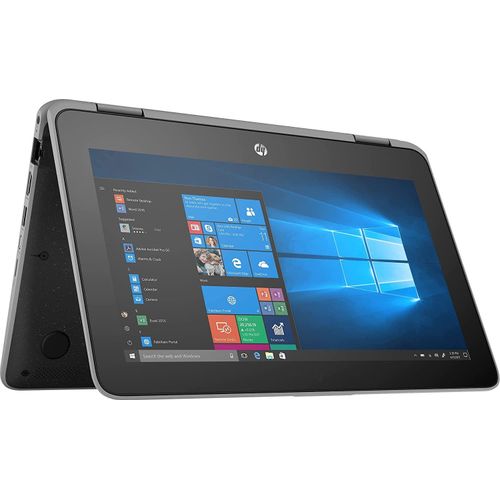
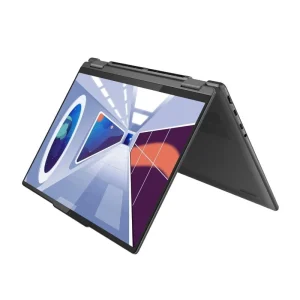
The HP ProBook x360 G3 features an 11.6-inch HD touchscreen with a 360-degree hinge, allowing seamless transitions between laptop, tablet, stand, and tent modes. This flexibility supports diverse tasks, from typing notes in laptop mode to presenting slideshows in tent mode. The compact 1.45 kg design and Corning Gorilla Glass 4 display ensure durability and portability, ideal for classroom or office use. The anti-glare screen reduces eye strain, making it suitable for extended study or work sessions.
Reliable Performance for Everyday Tasks
Powered by an Intel Celeron N4100 processor and 4GB of RAM, this laptop handles basic productivity tasks like web browsing, document editing, and video streaming efficiently. The 64GB eMMC storage provides sufficient space for essential files, while the fanless design ensures quiet operation in noise-sensitive environments. Integrated Intel UHD Graphics 600 support light multimedia tasks, delivering clear visuals for presentations or casual media consumption.
Use Cases for HP ProBook x360 G3
Educational Environments
The HP ProBook x360 G3 excels in educational settings, supporting students and teachers with its versatile design. Students can take notes using the touchscreen in tablet mode or collaborate in stand mode during group projects. The MIL-STD-810G durability withstands classroom wear, such as accidental drops. However, the 64GB storage may fill quickly with large files, requiring cloud storage or external drives. Pair it with computer accessories like a stylus for enhanced note-taking.
Small Business Productivity
Small business owners benefit from the laptop’s ability to handle daily tasks like email, bookkeeping, and customer management software. The touchscreen supports quick navigation, and the USB-C port allows connection to monitors for presentations. The 720p webcam and dual microphones ensure clear video calls, though audio quality may require external speakers for larger meetings. The limited RAM may slow performance when running multiple heavy applications simultaneously.
Field and Mobile Work
For professionals working on the go, such as retail or field service staff, the HP ProBook x360 G3 offers portability and durability. Its spill-resistant keyboard and rugged build protect against minor accidents, making it suitable for challenging environments. The 11-hour battery life supports all-day use without recharging, though the 1366 x 768 resolution may not deliver the sharpest visuals for detailed graphic work.
Casual Media Consumption
For personal use, this laptop streams videos and music with decent clarity on its 11.6-inch display. The stand mode is perfect for watching tutorials or movies hands-free. However, the 220-nit brightness limits visibility in bright environments, and the 4GB RAM may cause lag with high-definition streaming on multiple tabs. The lack of a dedicated GPU restricts its use for gaming or graphic-intensive tasks.
Compatibility of HP ProBook x360 G3
The HP ProBook x360 G3 is compatible with a wide range of devices and systems, running Windows 10 Pro for seamless integration with educational and business software. It connects to external displays via HDMI or USB-C, making it ideal for presentations when paired with desktops. The laptop supports peripherals like external drives or mice through two USB 3.1 Gen 1 Type-A ports and one USB-C port.
Wi-Fi 5 and Bluetooth 4.2 ensure reliable wireless connectivity for online classes or cloud-based work. The microSDXC card slot allows storage expansion, addressing the limited 64GB eMMC capacity. No additional drivers are needed for setup, but BIOS updates enhance performance. A drawback is the single USB-C port, which may require a hub for multiple modern peripherals. Learn more at HP ProBook x360 11 G3 Specs.
Technical Specifications for HP ProBook x360 G3
The HP ProBook x360 G3 offers reliable specifications for budget-conscious users.
Hardware and Performance
- Processor: Intel Celeron N4100, 1.1 GHz (up to 2.4 GHz, 4MB cache, 4 cores)
- Graphics: Intel UHD Graphics 600
- Memory: 4GB LPDDR4-2400 SDRAM (soldered, non-upgradable)
- Storage: 64GB eMMC
- Operating System: Windows 10 Pro 64-bit
Display and Input
- Display: 11.6-inch HD (1366 x 768), IPS, touchscreen, 220 nits, 50% NTSC, anti-glare
- Aspect Ratio: 16:9
- Input Devices: Spill-resistant keyboard, ClickPad with multi-touch gestures
- Webcam: 720p HD user-facing, 1080p world-facing
- Audio: Dual speakers, dual digital microphones
Connectivity and Battery
- Ports: 2 x USB 3.1 Gen 1 Type-A, 1 x USB-C 3.1 Gen 1 (data only), 1 x HDMI 1.4b, 1 x RJ45, 1 x microSDXC, 1 x headphone/mic combo
- Wireless: Intel Dual Band Wireless-AC 8265 (802.11ac, 2×2), Bluetooth 4.2
- Battery: 3-cell, 48Wh Li-ion, up to 11 hours
- Charger: 45W USB-C adapter
- Security: TPM 2.0, optional fingerprint reader
Physical Specifications
- Dimensions (W x D x H): 30.24 x 20.75 x 1.98 cm
- Weight: 1.45 kg
- Build: Silver, MIL-STD-810G certified, Corning Gorilla Glass 4
- Accessories: 45W USB-C charger
The fanless design ensures silent operation, but the non-upgradable RAM and limited storage restrict future-proofing. The eMMC storage is slower than SSDs, impacting large file transfers. Compare with HP Series 5 Monitor for setups. Visit HP Support for updates.
Benefits and Drawbacks of HP ProBook x360 G3
The HP ProBook x360 G3 offers excellent versatility with its 360-degree hinge, supporting multiple usage modes for diverse tasks. Its MIL-STD-810G durability ensures reliability in rugged environments, ideal for students or field workers. The 11-hour battery life supports all-day use, while the touchscreen enhances interactive learning or presentations. The spill-resistant keyboard protects against accidents, adding longevity. Wi-Fi 5 provides stable connectivity for online tasks.
However, the 4GB RAM and Celeron processor limit performance for heavy multitasking or modern applications. The 64GB eMMC storage may require external solutions for larger files. The 220-nit display struggles in bright settings, and the 50% NTSC gamut limits color accuracy for creative work. Despite these, its affordability and durability make it a practical choice for budget users.



 No products in the cart.