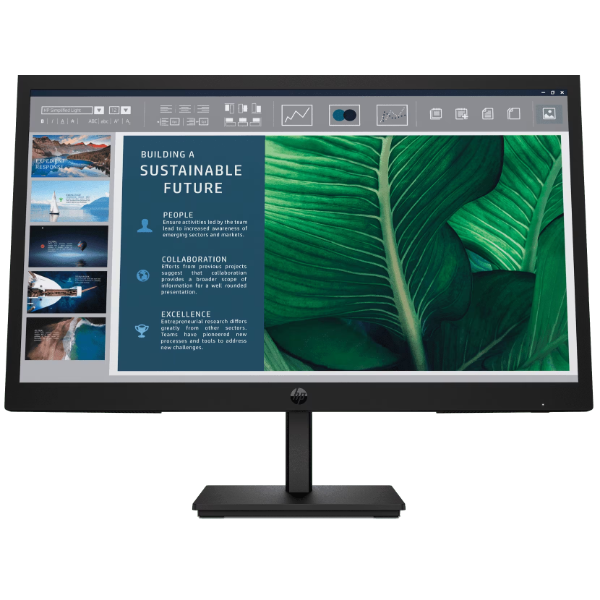
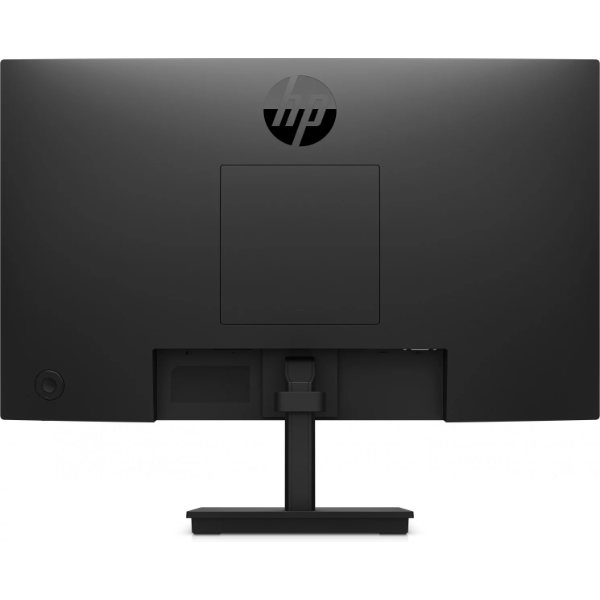

Here’s the fully crafted product description for the HP Series 3 Pro 21.45″ FHD Monitor:
HP Series 3 Pro 21.45″ FHD Monitor (9U5A2AA) — A Sharp, Reliable Display Built for the Modern Workspace
Whether you’re managing spreadsheets, editing documents, joining video calls, or setting up a dual-display workstation, the HP Series 3 Pro 21.45-inch FHD Monitor delivers clear, comfortable visuals at a price point that makes sense for businesses and home offices alike. Available at Novatech Technologies, this display pairs a feature-rich specification sheet with HP’s longstanding commitment to build quality and eye-care technology.
🖥️ Display Quality That Gets the Job Done
At the heart of this monitor is a VA (Vertical Alignment) LCD panel — a technology known for deeper blacks and superior contrast compared to standard IPS or TN alternatives at the same price tier. With a 3000:1 contrast ratio, content appears richer and more defined, especially in productivity tasks where clarity matters.
The 1920 x 1080 Full HD native resolution at 103 pixels per inch ensures crisp text rendering and detailed imagery across a 21.45″ diagonal screen. Paired with an anti-glare coating rated at 3H hardness, the panel handles bright environments without producing the distracting reflections that glossy screens are prone to.
Panel Brightness & Colour Coverage
- Brightness: 250 nits — adequate for most indoor lighting conditions
- Colour Gamut: 72% NTSC — suitable for general productivity, web content, and document work
- Backlight: Edge-lit WLED for even illumination
- Panel bit depth: 8-bit (6-bit + FRC) — delivers smooth tonal gradations
- Aspect ratio: 16:9 widescreen — standard for modern workflows and video content
👁️ Eye Comfort Features You’ll Actually Notice
One of the standout qualities of this monitor isn’t its brightness or contrast — it’s how it protects your eyes during long workdays. HP has built in two TÜV Rheinland-certified technologies specifically designed to reduce eye strain:
- Flicker-Free Display — Eliminates the screen flicker common in budget monitors, reducing headache-inducing visual fatigue during extended sessions.
- HP Eye Ease (Low Blue Light Hardware Solution) — Filters harmful blue light at the hardware level, not via software filters that distort colour accuracy. This means your eyes are protected without compromising how content looks on screen.
These aren’t marketing buzzwords — both certifications are independently verified by TÜV Rheinland, one of the world’s leading testing and certification bodies.
⚙️ Full Technical Specifications
Core Display Specs
- Screen Size: 54.5 cm / 21.45″ diagonal
- Panel Type: VA; LCD
- Native Resolution: FHD (1920 x 1080)
- Maximum Resolution: 1920 x 1080 @ 100 Hz (HDMI)
- Contrast Ratio: 3000:1
- Brightness: 250 nits
- Response Time: 5ms GtG (with scalar overdrive)
- Refresh Rate: Up to 100 Hz via HDMI
- Pixel Pitch: 0.25 x 0.24 mm
- Pixels Per Inch: 103 ppi
- Colour Gamut: 72% NTSC
- Anti-Glare: Yes (3H hardness)
- Backlight: Edge-lit WLED
Connectivity
- 1× HDMI 1.4 (supports HDCP, up to 100 Hz)
- 1× VGA (up to 60 Hz)
- HDCP: Yes (HDMI only)
- No integrated camera or USB hub
Ergonomics & Build
- Tilt adjustment: −5° to +23°
- Horizontal viewing angle: 178°
- Vertical viewing angle: 178°
- VESA mounting: 100 × 100 mm
- Detachable stand: Yes
- Bezel: Narrow
- Curvature: Flat
Dimensions & Weight
- Without stand: 50.42 × 5.08 × 30.3 cm
- With stand: 50.42 × 18.05 × 38.69 cm
- Weight with stand: 2.8 kg
Power
- Input: 100–240 VAC, 50/60 Hz (universal)
- Power supply: Internal
- Maximum consumption: 22 W
- Typical consumption: 11 W
- Standby: 0.5 W
Software & Security
- Management software: HP Display Center; HP Client Management Script Library
- Physical security: Standard lock slot
🔌 Connectivity: Simple, Practical, Compatible
This monitor ships with both HDMI 1.4 and VGA ports, making it a flexible pick for a wide range of setups. Whether you’re connecting a modern laptop or an older desktop PC, at least one of these ports will suit your needs without requiring an adapter.
The HDMI 1.4 port unlocks the monitor’s highest performance ceiling — 1920 × 1080 @ 100 Hz — delivering noticeably smoother scrolling and cursor movement compared to the standard 60 Hz experience. For longer cable runs across a desk or room divider, pairing this monitor with a quality 10m HDMI cable keeps the setup clean and reliable.
The monitor’s onscreen display (OSD) offers manual controls for Brightness, Colour, Image, Input, Power, Menu, Management, Information, and Exit — giving you direct control over the display without relying entirely on software.
📦 What’s Included in the Box
- HP Series 3 Pro Monitor (9U5A2AA)
- HDMI cable
- AC power cord
- Quick Setup Poster
- Warranty card
The internal power supply means no external power brick clutters your desk — just plug in the AC cord and go.
🌱 Sustainability Credentials
HP has made a visible effort to build eco-conscious manufacturing into this product’s lifecycle:
- 85% ITE-derived closed-loop plastic used in the chassis
- 10% recycled metal components
- Low halogen construction
- 100% sustainably sourced and recyclable moulded paper pulp cushioning inside the box
For businesses with green procurement policies or ESG reporting commitments, these credentials add tangible value. You can explore the full range of HP monitors at Novatech to find other models with similar sustainability ratings, or browse the broader selection of monitors for a complete comparison.
For HP’s own global monitor catalogue, the HP Africa & EMEA monitor page provides an authoritative reference.
✅ Key Benefits
1. Exceptional Contrast for a Budget-Friendly VA Panel The 3000:1 contrast ratio is a genuine differentiator at this price point. VA panels produce far deeper blacks than TN alternatives, making text on dark backgrounds and dark-themed applications look noticeably better.
2. Smooth 100 Hz Refresh Rate via HDMI While not a gaming monitor, the 100 Hz ceiling via HDMI translates to a visibly smoother desktop experience — windows animate more fluidly, scrolling feels less choppy, and cursor movement is more precise than on 60 Hz displays.
3. Certified Eye Protection Built Into the Hardware Both the flicker-free and low blue light certifications come from TÜV Rheinland — not self-reported. For users logging 6–10 hours daily in front of a screen, this is one of the most practical advantages this monitor offers.
4. Universal Power Supply The 100–240V internal PSU works across Kenya, East Africa, Europe, and beyond — no voltage converter needed when travelling or relocating equipment.
5. Versatile Mounting Options VESA 100×100mm compatibility means this display can be wall-mounted or attached to a third-party arm, freeing up desk space significantly and enabling ergonomic height adjustment beyond what the stand alone provides.
⚠️ Drawbacks to Consider Before Buying
1. No Height or Swivel Adjustment The stand only tilts (−5° to +23°). There is no height adjustment, pivot, or swivel — ergonomic positioning relies entirely on desk height or an aftermarket VESA arm.
2. Limited Colour Gamut At 72% NTSC, this monitor covers the sRGB range adequately for productivity and general use, but it falls short for colour-critical work like photo editing, graphic design, or video grading. Creative professionals should look at wider-gamut alternatives.
3. No USB Hub or Built-In Camera The monitor has zero USB ports and no integrated webcam — everything routes through your computer directly. For setups with multiple peripherals, this may create desk cable clutter without a hub.
4. VGA Port Shows Its Age VGA is an analogue signal that cannot match HDMI’s clarity at full resolution. If your system only has VGA output available, you’ll be capped at 60 Hz and may notice slightly softer image quality compared to HDMI.
5. 250 Nits Brightness May Fall Short in Bright Rooms In offices with direct sunlight or high ambient lighting, 250 nits can feel dim. The anti-glare coating helps, but pairing this monitor with position control (blinds, screen orientation) is advisable.
🏁 Final Verdict
The HP Series 3 Pro 21.45″ FHD Monitor (9U5A2AA) is a well-engineered, productivity-first display that earns its place in offices, home workstations, and multi-monitor setups. Its VA panel delivers punchy contrast, the 100 Hz HDMI refresh rate adds day-to-day smoothness, and the dual TÜV-certified eye protection features make long working sessions genuinely more comfortable. It won’t satisfy colour professionals or competitive gamers, but for the vast majority of office, administrative, and remote work use cases, it delivers reliable performance at a sensible price.







 No products in the cart.