

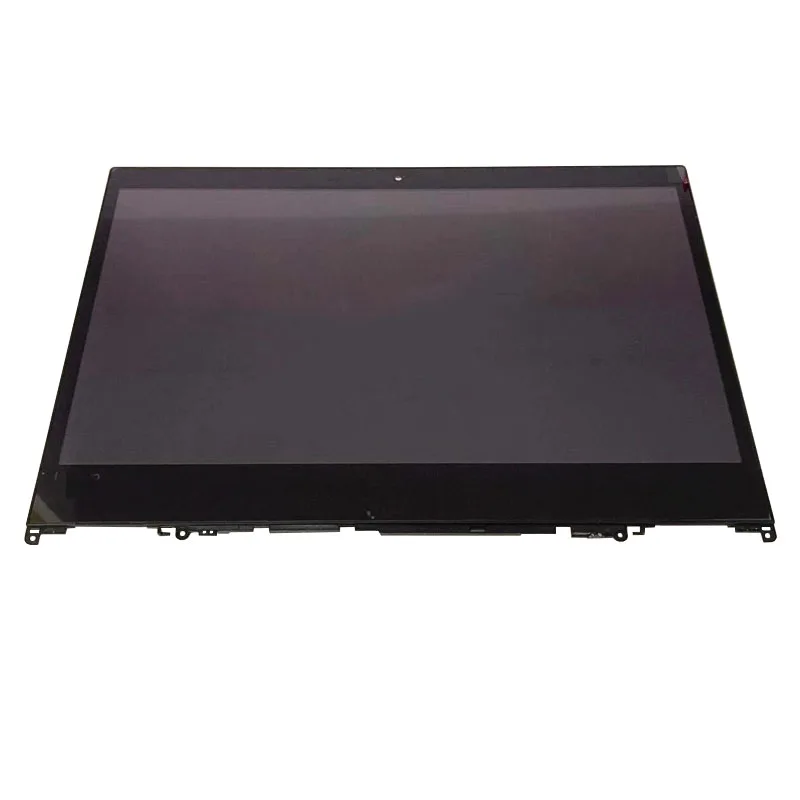
Lenovo Yoga 520-14 Replacement Touch Screen
Lenovo Yoga 520-14 Replacement Touch Screen brings new life to your device. This high-quality assembly fixes common display issues. It includes a full LCD panel with touch digitizer. The bezel frame ensures a perfect fit. Users in Kenya restore their laptops easily.
Many face screen cracks from accidental drops. Touch response may fade over time due to wear. Dead pixels or backlight failures occur frequently. Replacing the entire unit solves these problems quickly. It returns the laptop to original performance levels.
The convertible design shines once more. Switch between modes without glitches. Notebook mode handles typing tasks smoothly. Tablet mode allows direct input on the screen. Tent and stand modes suit viewing needs.
This replacement maintains high touch sensitivity. Ten-point multi-touch supports gestures like pinch-to-zoom. Swiping through apps feels natural again. It works well in bright environments too.
Compatibility focuses on Lenovo Yoga 520-14 series. It covers 520-14IKB models like 80X8 and 81C8. Similar Flex 5-1470 variants fit as well. Choose HD or FHD resolution to match originals. The standard eDP 30-pin connector simplifies connections
Use Cases for Lenovo Yoga 520-14 Replacement Touch Screen
Explore various scenarios where this replacement excels. It adapts to daily demands across sectors.
Professional Work Environments
Business users fix screens to avoid downtime. Handle emails and reports with touch navigation. Annotate documents during virtual meetings. The responsive display boosts efficiency in offices.
Educational Settings
Students restore interactive learning tools. Take notes in tablet mode directly. Teachers use it for classroom demonstrations. Compatibility with apps enhances study sessions.
Campus Mobility Advantages
On-the-go users in Kenya appreciate quick repairs. Carry the laptop without display worries. Touch features support group projects outdoors.
Creative and Design Applications
Artists revive sketching capabilities. Use optional stylus for detailed work. The multi-touch screen handles editing software well. Colors appear vibrant after replacement.
Home Entertainment and Leisure
Families enjoy movies in stand mode again. Browse social media with ease. Gaming apps respond to touch controls smoothly. It integrates with home networks seamlessly.
Media Consumption Benefits
Stream content without interruptions. The IPS panel delivers wide viewing angles. Brightness levels suit indoor lighting conditions.
Compatibility Details of Lenovo Yoga 520-14 Replacement Touch Screen
This assembly matches specific hardware requirements. Ensure your model aligns for best results.
Device Model Matching
Supports Lenovo Yoga 520-14 and variants. Check serial numbers before purchase. It fits 80X8 and 81C8 series perfectly.
Resolution and Panel Options
Available in HD 1366×768 resolution. FHD 1920×1080 provides sharper images. IPS technology ensures color accuracy.
Connector Specifications
Uses eDP 30-pin interface. 20mm width fits standard slots. Handle cables gently during setup.
Peripheral Integration
Connect to external monitors via HDMI. Pair with Bluetooth devices easily. USB ports support storage drives.
Browse our selection of laptops for complete units. Enhance setups with monitors from trusted brands.
Technical Specifications
Review the detailed specs below. They ensure reliable performance.
Display Components
Screen Size — 14.0 inches diagonal.
Resolution Options — HD at 1366×768 pixels. FHD at 1920×1080 pixels.
Touch Technology — Capacitive multi-touch with 10-point support.
Panel and Build
Panel Type — IPS LED-backlit LCD for vivid visuals.
Brightness Level — Ranges from 220 to 250 nits.
Aspect Ratio — Standard 16:9 widescreen.
Finish and Bezel
Surface Finish — Glossy or anti-glare depending on variant.
Bezel Included — Full frame assembly for easy installation.
Connectivity and Compatibility
Connector Type — eDP 30-pin standard.
Compatible Models — Lenovo Yoga 520-14, 520-14IKB (80X8, 81C8), Flex 5-1470.
Backlight System — LED with efficient diode lamps.
Installation Requirements
Tools Needed — Screwdrivers and plastic pry tools recommended.
Weight Addition — Minimal impact on overall device weight.
These specifications match factory standards. They deliver consistent touch and visual quality.
For expert repair advice, visit Lenovo Support. Learn disassembly steps from iFixit.
Installation Guide for Lenovo Yoga 520-14 Replacement Touch Screen
Follow high-level steps for successful replacement. Professional help is advised for beginners.
Preparation Steps
Gather tools like screwdrivers and anti-static mats. Back up data before starting. Power off the device completely.
Removal Process
Remove bottom screws carefully. Pry open the bezel clips gently. Disconnect battery and display cables.
Cable Handling Tips
Label connectors for reassembly. Avoid bending flex cables sharply.
Assembly Integration
Align the new screen assembly. Secure cables in proper slots. Test touch response before closing.
Testing and Troubleshooting
Power on to check display. Calibrate touch if needed. Address any issues promptly.
This guide ensures a smooth process. It extends your laptop’s lifespan effectively.
Pair with accessories from our computer accessories category.
Why Trust Novatech
Novatech Technologies stands as a reliable source in Kenya. We supply genuine parts with thorough testing. Each replacement includes a standard warranty period. Our Nairobi team offers prompt support services. Experts guide you through queries or installations. Visit Novatech Technologies for authentic products. Choose us for quality and peace of mind.
Explore reviews on convertible repairs at NotebookCheck.





 No products in the cart.