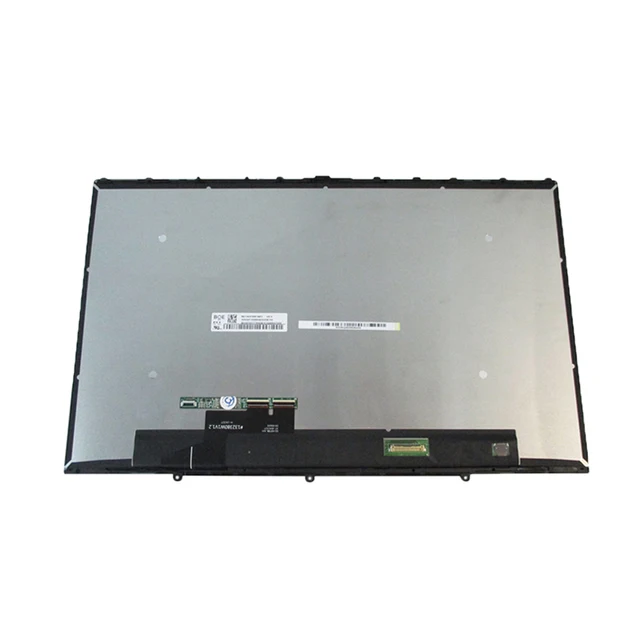
Lenovo Yoga C740-14IML Touchscreen Replacement
Lenovo Yoga C740-14IML Touchscreen Replacement revives your sleek convertible laptop’s display. This complete assembly restores precise multi-touch capability. It features LCD panel, capacitive digitizer, and bezel frame. Users in Kenya address screen damage efficiently.
Drops frequently crack the glass. Extended use leads to touch degradation. Backlight problems or pixel issues develop gradually. Replace the full assembly for consistent performance. It returns the device to original touch sensitivity levels.
The 360-degree hinge functions smoothly afterward. Modes switch without resistance. Notebook mode handles detailed input. Tablet mode supports finger gestures directly. Tent mode enables easy sharing. Stand mode optimizes viewing angles.
Ten-point multi-touch captures inputs accurately. Pinch-to-zoom operates fluidly. Swipe gestures navigate interfaces effortlessly. The panel maintains clarity in different environments.
Compatibility targets Lenovo Yoga C740-14IML series. It fits models like 81TC series variants. Resolution stays at FHD 1920×1080. The eDP 30-pin connector (approximately 19mm width) ensures direct compatibility.
Post-replacement, connect external devices seamlessly. HDMI or USB-C extends displays. Bluetooth pairs peripherals instantly. Wireless connectivity remains stable.
Use Cases for Lenovo Yoga C740-14IML Touchscreen Replacement
This replacement suits varied daily applications. It improves interaction in multiple scenarios.
Professional Workflows
Users control software through touch efficiently. Manage documents interactively. The responsive screen aids focused productivity.
Educational Tools
Learners engage platforms directly. Input information hands-on. Touch features enhance study processes.
Flexible Learning Mobility
Students transport repaired devices reliably. Apply touch in various settings. Gestures enable fast operations.
Creative Editing
Designers manipulate elements precisely. Work with editing tools smoothly. Multi-touch supports detailed tasks. Display quality impresses visually.
Personal Media Use
Households access content comfortably. Navigate apps with ease. Touch improves casual experiences. It fits relaxed activities.
Viewing Comfort
Stream media in optimal positions. IPS technology delivers even angles. Brightness suits ambient conditions.
Compatibility Details of Lenovo Yoga C740-14IML Touchscreen Replacement
Verify specifications for perfect integration. Confirm details before selection.
Model Series Alignment
Supports Lenovo Yoga C740-14IML (81TC type). Match machine type precisely. Covers standard configurations.
Display Resolution Standard
FHD at 1920×1080 pixels. IPS panel ensures sharp visuals. No other resolutions typically offered.
Connector Specifications
Features eDP 30-pin interface. Width around 19mm. Provides secure connection.
External Device Support
Extend workspace via HDMI. Sync Bluetooth accessories quickly. Ports handle various inputs.
Browse our laptops for full options. Pair with reliable monitors like the HP Series 5 23.8-inch FHD Monitor.
Technical Specifications
Review these attributes closely. They match original factory standards.
Display Core Features
Screen Size — 14.0 inches diagonal.
Resolution — FHD 1920×1080 pixels.
Touch Technology — 10-point capacitive multi-touch digitizer.
Panel Attributes
Panel Type — IPS LED-backlit LCD.
Brightness — Approximately 250-300 nits.
Aspect Ratio — 16:9 widescreen.
Surface Details
Finish — Glossy anti-scratch.
Bezel — Full frame assembly included.
Interface and Build
Connector — eDP 30-pin standard.
Compatible Models — Yoga C740-14IML (81TC series).
Backlight — Efficient LED diodes.
Installation Requirements
Tools — Precision screwdrivers, plastic pry tools needed.
Weight Impact — Maintains ultrathin profile.
These specs deliver authentic response and image quality.
Consult Lenovo Support for official guidance. Follow step-by-step tutorials at iFixit.
Installation Guide for Lenovo Yoga C740-14IML Touchscreen Replacement
Perform the process carefully. Consider professional service for safety.
Setup Preparation
Gather necessary tools. Back up all data. Shut down and disconnect power.
Disassembly Steps
Remove bottom cover screws. Pry bezel edges gently. Disconnect battery and display cables.
Cable Safety
Record connector positions. Prevent damage to flex cables.
Assembly Installation
Position new unit accurately. Reattach cables securely. Check touch prior to sealing.
Post-Installation Checks
Power on the laptop. Verify display output. Calibrate touch if prompted. Address issues promptly.
This procedure extends usability. It reactivates full convertible features.
Enhance with products from our computer accessories category.
Why Trust Novatech
Novatech Technologies supplies authentic parts across Kenya. We test assemblies thoroughly. Lenovo Yoga C740-14IML Touchscreen Replacement includes warranty support. Nairobi team offers dedicated assistance. Specialists handle inquiries efficiently. Shop confidently at Novatech Technologies. Trust a dependable local source.
Explore more on convertible repairs via NotebookCheck.





 No products in the cart.