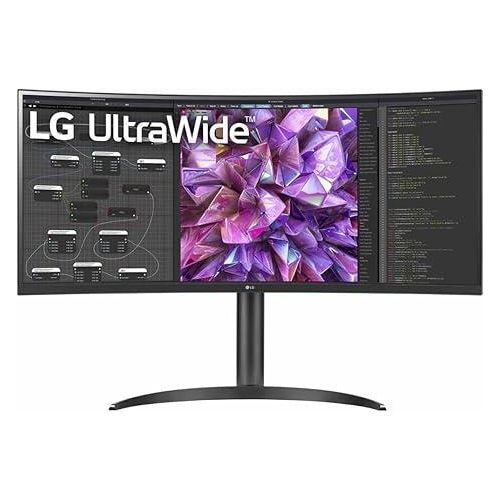
LG 34″ Curved UltraWide QHD Monitor: Ultimate Single-Cable 3440×1440 Workstation
The LG 34″ Curved UltraWide QHD monitor delivers breathtaking 3440×1440 resolution on a huge 21:9 VA panel with gentle 3800R curvature. This flagship all-in-one hub combines 90W USB-C power delivery, built-in KVM, Gigabit LAN, and full height/tilt stand — the perfect solution for Kenyan professionals who want one cable for video, power, network, peripherals, and even dual-PC control.
Detailed Use Cases for LG 34″ Curved UltraWide QHD Monitor
Single-Cable Corporate & Hot-Desk Docking
Connect just one USB-C cable and instantly get:
- Full 3440×1440 @ 60Hz video
- 90W power delivery (keeps MacBook Pro, Dell XPS, ThinkPad X1, HP EliteBook fully charged)
- Stable Gigabit internet via built-in RJ45
- Keyboard, mouse, SSD, webcam via downstream USB ports
- Second monitor via DisplayPort daisy-chain
No separate dock, no cable mess — ever.
Built-in KVM Dual-PC Control
Control two computers (work laptop + personal desktop) with one keyboard, mouse, and monitor. Switch instantly via hotkey or button — ideal for developers, traders, IT admins, and anyone juggling multiple systems.
Video Editing & Content Creation Powerhouse
Editors fit 4K timeline + full tool panels + preview on one screen. 99% sRGB + factory calibration ensures color-critical accuracy. The gentle 3800R curve reduces eye movement across the ultra-wide canvas.
Photographers manage massive Lightroom catalogs with dozens of thumbnails visible at once.
Finance & Trading Command Center
Traders display 8–10 charts simultaneously without overlap. Built-in LAN guarantees rock-solid connectivity during market hours. KVM switches instantly between office and personal PC.
Hybrid Work & Hot-Desking
Remote workers plug one USB-C cable and are fully operational in seconds. Hot-desk teams share monitors without re-plugging peripherals — everything stays connected.
Cinematic Entertainment After Hours
Watch true 21:9 movies with no black bars. Play supported titles (Starfield, Cyberpunk 2077, Flight Simulator) in native ultra-wide glory. Built-in speakers + headphone jack provide instant audio.
Compatibility with Every Modern Device
The LG 34″ Curved UltraWide QHD monitor works flawlessly with:
- MacBook Pro/Air M1–M4 (90W + full resolution)
- Dell XPS, Latitude, Precision
- Lenovo ThinkPad X1/P/T series
- HP EliteBook, ZBook, Spectre
- Microsoft Surface Laptop/Pro
Explore compatible laptops at Novatech Technologies’ laptops category. Pair with mini-PCs or workstations from Novatech Technologies’ desktops category. Visit our full store at Novatech Technologies.
Technical Specifications of LG 34″ Curved UltraWide QHD Monitor
Display Performance
- Screen Size: 34 inches diagonal (3800R curvature)
- Panel Type: VA with LED backlight
- Resolution: 3440 × 1440 WQHD (21:9)
- Refresh Rate: 60 Hz
- Brightness: 300 cd/m²
- Contrast Ratio: 3000:1
- Color Gamut: 99% sRGB
- Viewing Angles: 178° / 178°
- HDR: HDR10 support
Full Connectivity & Docking
- Video In: 2× HDMI, 1× DisplayPort 1.4
- USB-C: 1× USB-C (90W PD + DP Alt Mode + data)
- USB Hub: 1× USB upstream, 2× USB downstream
- Network: 1× RJ45 Gigabit Ethernet
- Audio: Headphone out 3-pole + built-in stereo speakers
- KVM: Built-in (dual-PC control)
Ergonomic Stand
- Adjustments: Height 110mm, tilt -5°/+20°
- VESA Mount: 100 × 100 mm
Health & Sustainability
- Reader Mode & Flicker Safe
- Low Blue Light certified
- Energy Star compliant
Why Trust Novatech for Your LG 34″ Curved UltraWide QHD Monitor
Novatech Technologies is Kenya’s authorized LG commercial display partner. Every unit includes official 1-year warranty with optional extension to 3 years. Our Nairobi service center stocks parts for rapid repair.
Free corporate support: bulk imaging, asset tagging, and on-site installation available. Nationwide next-day delivery for orders over 5 units. Thousands of Kenyan businesses run on our verified stock. Browse more ultrawide displays in Novatech Technologies’ monitors category.
One cable. Two PCs. Zero clutter.
Getting the Most from Your LG 34″ Curved UltraWide QHD Monitor
- Connect USB-C upstream first → instant 90W charging + LAN + USB hub
- Use LG OnScreen Control to split screen into 8 zones
- Press KVM button to switch between work and personal PC
- Enable Reader Mode for long document sessions
- Adjust height so top of screen is at eye level
Discover full features at LG 34WQ73A Product Page. Learn USB-C docking benefits at LG USB-C Guide. View sustainability at Energy Star Registry.
This is the ultrawide that finally replaces two monitors — and your dock.





 No products in the cart.