

V2com W3 Triple-Screen 15.6-Inch Extension
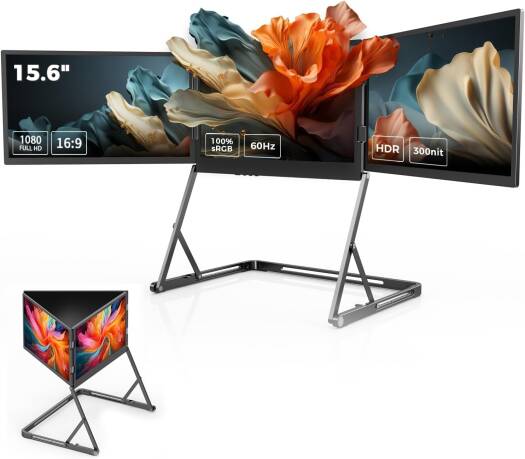
The V2com W3 Triple-Screen Extension is a revolutionary productivity accessory designed to transform your laptop into a multi-display powerhouse. Featuring three 15.6-inch Full HD (1080p) screens, including an auto-rotating rear screen, this extension delivers unmatched multitasking capabilities, ergonomic flexibility, and immersive visuals. With its single-cable connection, it ensures effortless setup and reduced clutter, making it the ultimate solution for professionals, students, and gamers who demand efficiency and clarity in their workflows.
V2com W3 Triple-Screen Connectivity
This extension connects via a single USB-C cable, simplifying setup and minimizing desk clutter. The triple-screen design provides expanded workspace, enabling users to run multiple applications side by side. Its auto-rotating rear screen adds versatility, allowing dynamic adjustments for presentations, collaboration, or entertainment.
V2com W3 Triple-Screen Specifications
- Model: W3
- Screen Size: Three 15.6-inch displays
- Resolution: 1080p Full HD
- Refresh Rate: 60Hz
- Connection: Single USB-C cable
- Adjustment: Auto-rotating rear screen for flexible viewing
- Build: Lightweight, durable casing for portability
These specifications highlight the extension’s efficiency and suitability for professional environments. Its ergonomic design ensures comfort, while its durable build supports long-term use.
Practical Applications
- Office Productivity – Expand your workspace for spreadsheets, documents, and multitasking.
- Creative Work – Ideal for designers, editors, and content creators needing extra screen space.
- Gaming Setup – Provides immersive visuals for casual and competitive gaming.
- Education Use – Perfect for students attending online classes or working on research projects.
- Travel Convenience – Compact design makes it easy to carry for mobile professionals.
Document Management and Connectivity
The triple-screen setup supports efficient document handling by ensuring multiple files remain visible simultaneously. Pairing it with reliable printers enhances productivity, supporting cohesive workflows.
Office Ecosystem Integration
This screen extension complements essential office hardware, including desktops and laptops. Together, they create a complete ecosystem that supports diverse tasks and enhances overall efficiency.
Networking and Expansion
Pairing this screen extension with networking products ensures uninterrupted connectivity during collaborative tasks. It supports streamlined workflows, ensuring cohesive operations across departments. For further insights into display standards, visit the Microsoft official site.
Professional Use Cases
From boardroom presentations to creative editing, this triple-screen extension supports professional documentation needs. It ensures every task reflects clarity and precision, reinforcing credibility in business communications. Organizations benefit from its ability to deliver consistent results across diverse applications.
Security and Reliability
Reliable visuals are vital for professional environments. This screen extension supports secure integration with laptops, ensuring consistent performance. Learn more about secure device standards at the HP official site.
High-Speed Productivity
With its 60Hz refresh rate and three Full HD screens, this extension supports demanding tasks. It reduces the need for multiple devices, enhancing productivity and reducing operational costs. This efficiency makes it a practical choice for organizations with diverse display requirements.
Presentation Standards
Professional environments demand clarity and consistency. This screen extension ensures visuals meet presentation standards, supporting business credibility. By delivering reliable display quality, it reinforces professionalism in every task, making it an essential tool for organizations that value quality communication.
Extended Technical Insights
The extension’s design emphasizes durability and portability. Its casing resists wear, ensuring longevity even with frequent travel. The compact form factor allows professionals to carry it easily, supporting mobile workstations. Its compatibility with multiple operating systems ensures flexibility across diverse environments.
The auto-rotating rear screen enhances usability by providing dynamic adjustments for presentations, collaboration, or entertainment. Its plug-and-play functionality eliminates technical barriers, making it accessible for users across skill levels.
Enhanced Workflow Integration
The screen extension integrates seamlessly into modern workflows. By supporting multiple devices, it eliminates the need for repeated adjustments. This enhances efficiency, allowing professionals to focus on tasks without interruptions.
Educational environments benefit from its versatility. Teachers can deliver lessons with clarity, ensuring smooth communication. Students gain reliable visuals for assignments, presentations, and collaborative projects.
Compatibility Across Devices
The screen extension supports a wide range of laptops and desktops. Its universal compatibility ensures users can rely on it across multiple platforms. For further details on device integration, visit the Dell official site.
Its compatibility extends to portable devices with USB-C ports, allowing users to set up presentations in diverse environments. This supports mobile productivity, enabling professionals to work efficiently even outside traditional offices.
Professional Documentation Support
The screen extension ensures documents and visuals remain accessible and presentable. By supporting clear display output, it enables efficient presentation management. Professionals can deliver reports and lectures with clarity, ensuring deadlines are met without delays.
Organizations benefit from its ability to support secure visual handling. By integrating with secure devices, it ensures sensitive information remains protected. This supports compliance across industries, reinforcing credibility in professional environments.
Integration with Office Hardware
The screen extension complements essential office hardware, including monitors and peripherals. By supporting multiple connections, it enhances productivity across departments.
Pairing it with projectors supports professional presentations. This ensures clarity and precision, reinforcing credibility in business communications. Its compatibility with diverse devices ensures flexibility across industries.
Why Customers Trust Novatech Technologies
We stand behind product quality fully, and ensure customers receive their products promptly. Novatech Technologies provides trusted solutions, ensuring every screen extension meets strict standards of performance and reliability. Customers rely on our commitment to excellence, knowing each product supports efficiency, clarity, and professional standards across diverse applications.





 No products in the cart.