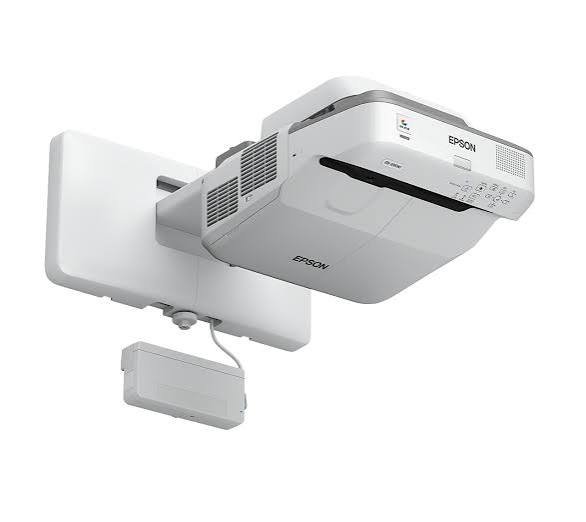
Epson EB-695Wi Interactive Ultra Short Throw Projector
The Epson EB-695Wi Interactive Ultra Short Throw Projector is designed to transform traditional classrooms, meeting rooms and training environments into interactive learning and presentation spaces. Combining Epson 3LCD projection technology with finger-touch functionality and dual interactive pens, it allows users to display content, write notes and collaborate directly on a projected screen.
With a brightness of 3,500 lumens, WXGA resolution and a projection size of up to 100 inches, the EB-695Wi delivers a large, clear display from a short distance. Its ultra-short-throw design also helps reduce shadows and glare, making it suitable for environments where presenters and learners need to interact closely with the projected content.
Interactive Finger-Touch and Dual Pen Technology
One of the key features of the Epson EB-695Wi is its interactive functionality. Unlike conventional projectors that only display content, this model allows users to interact directly with the projected image.
Its finger-touch technology enables users to write, draw, highlight and annotate content using their fingers. This makes lessons and presentations more engaging because participants can interact with information on the screen instead of relying entirely on a computer or traditional presentation controls.
The projector also supports dual interactive pens. This allows two users to write or work on the projected screen simultaneously. For example, a teacher and student can solve a problem together, or two colleagues can contribute to a presentation during a meeting.
These interactive capabilities make the EB-695Wi particularly useful in schools, universities, training centres and collaborative workplaces. Epson’s official interactive projector support documentation provides further information about its finger-touch and dual-pen functions.
Ultra Short Throw Projection for Flexible Installation
The Epson EB-695Wi features an ultra-short-throw projection system. This allows it to produce a large image while positioned very close to the projection surface.
With a throw ratio of approximately 0.28–0.37:1, the projector can display images ranging from 60 to 100 inches. This makes it suitable for classrooms and meeting rooms where installation space may be limited.
The short projection distance also reduces the likelihood of presenters casting shadows across the screen. Additionally, it helps minimise glare directed towards people standing near the projected image.
The projector can be installed using its compatible wall-mounting bracket. This creates a more organised presentation area by keeping the projector above the screen rather than placing it on a desk or requiring a long-distance installation.
Bright and Clear WXGA Projection
The EB-695Wi uses Epson’s 3LCD projection technology to produce bright images with consistent white and colour light output. It delivers 3,500 lumens of white brightness and 3,500 lumens of colour brightness, helping presentations remain visible in different lighting conditions.
Its native WXGA resolution of 1280 × 800 pixels provides a 16:10 aspect ratio. This format offers additional vertical screen space compared with standard widescreen 16:9 displays, making it useful for educational presentations, documents and computer-based content.
Furthermore, the projector features a contrast ratio of 14,000:1. This helps distinguish darker and brighter areas of an image, supporting clear text and detailed presentation content.
For more information about Epson’s projection technology, visit the official Epson website.
Large Display for Classrooms and Meeting Rooms
With support for projection sizes of up to 100 inches, the Epson EB-695Wi provides a large viewing area for group presentations and interactive activities.
Teachers can display lesson materials, diagrams, videos and digital learning resources for an entire classroom. Students can then participate by adding notes, answering questions and interacting with displayed content.
In business environments, the large projection area supports meetings, training sessions and collaborative discussions. Teams can review documents, share ideas and make annotations during presentations.
The projector also supports split-screen functionality, allowing two different sources of content to appear simultaneously. This is useful when comparing information or displaying presentation material alongside another visual source.
Multiple Connectivity Options
The Epson EB-695Wi includes several connection options for integrating it into existing presentation environments. Its interfaces include HDMI, VGA, USB, Ethernet and audio connections.
These options allow users to connect compatible computers and other presentation equipment. The projector also supports USB display functionality, which can transmit image, mouse and sound information through a compatible USB connection.
Wireless projection is available through an optional wireless LAN connection. This allows compatible devices to share content without requiring a direct cable connection.
The projector also supports Epson iProjection functionality, providing additional options for wireless content sharing when the appropriate equipment and software are available.
Built-In Speaker and Reliable Performance
The EB-695Wi includes a built-in 16W mono speaker for audio during lessons, videos and presentations. This provides an integrated audio option for smaller rooms without necessarily requiring a separate speaker system.
It uses a 250W UHE lamp, with a rated lamp life of up to 5,000 hours in normal mode and up to 10,000 hours in economy mode. The extended economy-mode lamp life helps reduce the frequency of lamp replacements when the projector is used regularly.
Its combination of interactive functionality, flexible installation and integrated audio makes it a practical presentation solution for institutions that require more than conventional image projection.
Ideal Applications of the Epson EB-695Wi
The Epson EB-695Wi is suitable for a range of professional and educational applications, including:
-
Schools and classrooms: Interactive lessons, digital teaching materials and student participation.
-
Universities and colleges: Lectures, collaborative learning and group presentations.
-
Training centres: Practical demonstrations, workshops and interactive training sessions.
-
Corporate meeting rooms: Business presentations, document reviews and team collaboration.
-
Conference and presentation spaces: Large-screen content display and interactive discussions.
Epson EB-695Wi Interactive Projector Specifications
| Feature | Specification |
|---|---|
| Model | Epson EB-695Wi |
| Projection Technology | 3LCD |
| Native Resolution | WXGA (1280 × 800) |
| Brightness | 3,500 lumens |
| Contrast Ratio | 14,000:1 |
| Aspect Ratio | 16:10 |
| Projection Size | 60–100 inches |
| Throw Ratio | 0.28–0.37:1 |
| Zoom | Digital, 1.0–1.35x |
| Focus | Manual |
| Interactive Features | Finger-touch and dual pen |
| Speaker | 16W mono |
| Lamp Type | 250W UHE |
| Lamp Life | Up to 5,000 hours normal; up to 10,000 hours economy |
| Connectivity | HDMI, VGA, USB, Ethernet and audio connections |
| Wireless | Optional wireless LAN |
Specifications are based on Epson’s published product documentation and may vary slightly by regional model or configuration.
Why Choose the Epson EB-695Wi?
The Epson EB-695Wi combines ultra-short-throw projection with interactive finger-touch and dual-pen capabilities. Its 3,500-lumen brightness, WXGA resolution and large projection size make it suitable for educational and professional environments.
More importantly, its interactive features allow users to participate directly in lessons and presentations. This makes it a useful choice for organisations looking to create more engaging and collaborative presentation spaces.


 No products in the cart.