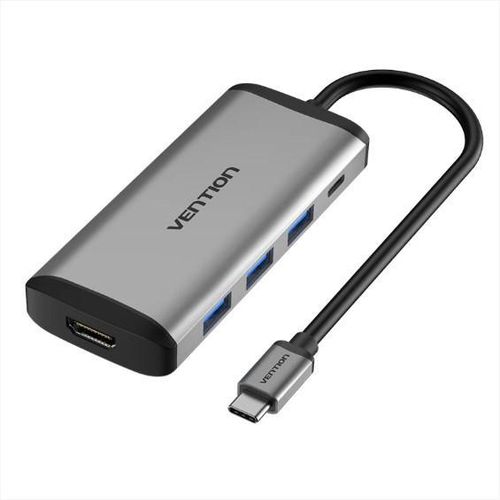
Vention USB-C 5-in-1 Docking Station
The Vention USB-C 5-in-1 Docking Station transforms thin USB-C laptops into productive workstations with essential ports. This sleek device connects via a single USB-C cable. It delivers 4K HDMI output, multiple high-speed USB connections, and reliable Power Delivery charging. Professionals and remote users eliminate adapter clutter effectively.
Detailed Use Cases and Compatibility
Upgrade Home and Office Setups
Modern laptops often lack sufficient ports. The Vention USB-C 5-in-1 Docking Station solves this instantly. Connect an external monitor through HDMI for extended desktop space. Work on spreadsheets while referencing documents side-by-side.
Three USB 3.0 ports attach keyboards, mice, and external hard drives. Transfer large files at 5Gbps speeds without waiting. 100W PD charging keeps your laptop powered during intensive tasks.
Facilitate Remote Work Efficiency
Remote professionals switch locations frequently. This compact station provides consistent connectivity anywhere. Plug in peripherals quickly at co-working spaces or hotels.
Stable video output supports virtual meetings. Fast charging ensures devices stay operational all day. Lightweight design slips into bags easily.
Support Content Creation Workflows
Creators manage multiple devices daily. Extend displays for better video editing timelines. Connect storage drives via USB for quick access.
PD charging sustains long rendering sessions. It compatible with Windows, macOS, ChromeOS, and select tablets. Devices need USB-C DisplayPort Alt Mode and PD support.
Discover suitable models at Novatech Technologies.
Technical Specifications
Video Output Capabilities
HDMI port supports 4K@30Hz resolution. Compatible with 1080p@60Hz and lower settings. Plated connectors maintain signal integrity.
Data Transfer Ports
Three USB 3.0 ports provide 5Gbps bandwidth each. Backward compatible with USB 2.0 devices. Hot-swappable functionality adds convenience.
Power Delivery Features
USB-C PD port accepts up to 100W input. Delivers approximately 87W to the host device. Enables simultaneous charging and peripheral use.
Build Quality Details
Aluminum alloy shell dissipates heat efficiently. Short integrated cable reduces clutter. Durable conductors ensure long-term reliability.
Plug-and-play operation requires no drivers. For display configurations, refer to Microsoft’s external monitor guide.
Why Choose Vention USB-C 5-in-1 Docking Station
This model focuses on core productivity features. Three USB 3.0 ports handle everyday peripherals. Strong PD charging supports power-hungry laptops.
Vention delivers reliable performance consistently. Aluminum construction enhances durability. Clean design fits professional environments perfectly.
It addresses common connectivity gaps economically. Users experience seamless daily operation.
Performance and Durability Strengths
Ports withstand repeated insertions. Efficient cooling prevents thermal issues. Quality components maintain stable connections.
Why Trust Novatech Technologies
Novatech Technologies offers authentic Vention products. We include a 1-year warranty against defects. Our team provides expert support across Kenya.
Free delivery applies to qualifying orders. 7-day returns ensure complete satisfaction. Browse computer accessories for complements.
Vention USB-C 5-in-1 Docking Station Applications
Benefit Business Professionals
Managers extend screens for reports. Connect multiple drives for data management. Charging powers through extended workdays.
Enhance Educational Tasks
Students project assignments clearly. Attach USB storage for file sharing. PD keeps laptops running during classes.
Aid Creative Individuals
Editors view footage on larger displays. USB ports link external resources. Reliable charging supports focused sessions.
Pair with displays from our monitors range for optimal results.
Maximizing Vention USB-C 5-in-1 Docking Station Performance
Position for good airflow. Update laptop drivers periodically. Clean ports to avoid dust accumulation.
Combine with laptops selection for portable setups. Enhance desktops options for stationary use.
For monitor pairing advice, see HP’s display resources.
Troubleshoot by testing individual connections. Novatech assistance available quickly.




 No products in the cart.