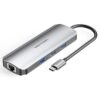
Vention USB-C 8-in-1 Docking Station TOKHB
The Vention USB-C 8-in-1 Docking Station TOKHB delivers essential connectivity in a sleek gray aluminum design. This compact hub features a 0.15m cable for easy placement. It supports 4K video output and fast charging. Users expand laptop capabilities quickly and reliably.
Detailed Use Cases and Compatibility
Boost Daily Office Efficiency
Professionals manage heavy workloads smoothly. The Vention USB-C 8-in-1 Docking Station TOKHB connects external monitors via HDMI. Display presentations or dashboards in 4K@30Hz clarity. Three USB 3.0 ports attach drives, printers, and scanners at once.
Transfer large reports at 5Gbps speeds. RJ45 Gigabit Ethernet ensures uninterrupted video meetings. SD and TF slots import client files directly from cameras.
Facilitate Remote Work Flexibility
Remote teams stay productive anywhere. 100W PD charging powers laptops during extended sessions. Photographers transfer high-resolution images rapidly via card readers.
Editors connect external storage seamlessly. The short cable keeps workspaces neat. It suits travel with its lightweight build.
Support Creative and Media Tasks
Creators handle demanding projects. Extend screens for better timelines. USB ports link tablets or hard drives. Stable Ethernet uploads files to cloud storage without drops.
It compatible with Windows, macOS, ChromeOS, and iPadOS devices. Requires USB-C with DisplayPort Alt Mode support. Explore options at Novatech Technologies.
Technical Specifications
Video Output Details
- HDMI port delivers 4K@30Hz resolution
- Backward compatible with 1080p and 720p
- Nickel-plated connectors for reliable signals
Data Transfer Capabilities
- 3 × USB 3.0 ports at 5Gbps speeds
- Compatible with USB 2.0 devices
- SD/TF card readers support UHS-I standard
- Simultaneous reading of both cards
Network and Power Features
- RJ45 port supports 10/100/1000Mbps Ethernet
- USB-C PD input up to 100W (20V/5A)
- Typically delivers 87W to host device
Construction and Dimensions
- Gray aluminum alloy shell for heat dissipation
- 0.15m integrated cable length
- Tinned copper conductors ensure stability
- Plug-and-play with no drivers required
For multi-monitor setups, reference Microsoft’s display guidelines.
Why Choose Vention USB-C 8-in-1 Docking Station TOKHB
This model provides balanced expansion without extras. Three USB 3.0 ports handle multiple peripherals. Card readers add convenience for media users. Durable design supports daily professional demands.
Premium Build Quality
Aluminum housing cools efficiently during use. Reinforced ports endure frequent connections. Advanced components maintain consistent performance.
Compact size fits bags or desks. It reduces cable chaos effectively.
Why Trust Novatech Technologies
Novatech Technologies offers verified Vention products. A 1-year warranty protects against defects. Our Kenyan team delivers fast support via phone or email.
Free shipping on orders over KSh 5,000. 7-day returns ensure satisfaction. Pair with computer accessories for bundles.
Vention USB-C 8-in-1 Docking Station TOKHB Applications
Aid Graphic Design Workflows
Designers connect large monitors. Attach input devices via USB. Import assets from memory cards quickly. Fast network shares proofs with clients.
Enhance Educational Sessions
Teachers project lessons clearly. Students access shared drives. Reliable Ethernet supports online resources. Complement with monitors range for visibility.
Streamline Small Business Operations
Offices connect tools affordably. USB ports manage scanners and printers. Gigabit connection handles transactions. Robust build withstands busy days.
Vention USB-C 8-in-1 Docking Station TOKHB in Networking
Teams integrate easily. Combine with networking solutions for complete infrastructure. The Ethernet port provides dependable speeds.
For USB-C best practices, view HP’s monitor connectivity.
Optimizing Your Vention USB-C 8-in-1 Docking Station TOKHB
Ensure good ventilation around the hub. Update laptop firmware regularly. Clean ports to avoid dust buildup.
Match with laptops selection for portable setups. Use alongside desktops category for fixed stations.
Resolve issues by checking connections first. Novatech assistance available promptly.






 No products in the cart.