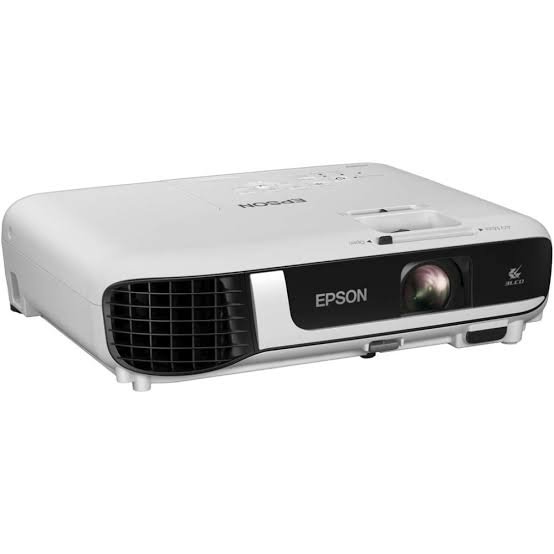
Epson EB-W53 WXGA Meeting Room Projector in Kenya
Meeting rooms are rarely dark. Windows let in daylight, and nobody wants to sit in the dark with a notepad. A dim projector turns every slide into a guessing game. The Epson EB-W53 WXGA Meeting Room Projector solves this problem. It pushes out 4,000 lumens of bright, sharp WXGA images, so your team can see every chart and figure with the lights on.
Why Brightness and WXGA Matter in a Meeting Room
Brightness decides whether people at the back of the room can read the screen. The EB-W53 delivers 4,000 lumens of both white and colour light. Because it uses Epson’s 3LCD technology, colours stay rich and natural instead of looking pale in a bright room.
Resolution matters just as much. WXGA (1280 × 800) uses the 16:10 shape found on most modern laptops. Your screen fills the wall with less wasted space, and spreadsheets, charts and text-heavy slides stay easy to read.
Key Features of the Epson EB-W53
- 4,000 lumens: The picture stays clear in well-lit offices, boardrooms and classrooms.
- 3LCD technology: White and colour brightness are equal, so images look vivid and true to life.
- WXGA resolution: The 1280 × 800 image suits laptops and keeps text sharp.
- High contrast: The 16,000:1 ratio gives images depth and clean detail.
- Two HDMI ports: Connect two devices at once and switch between them without swapping cables.
- Split screen: Show two sources side by side, such as a report and a video call.
- Large display: Project from 33 inches up to 375 inches.
- Easy alignment: Keystone correction of ±30° works vertically and horizontally.
- Long lamp life: The lamp lasts up to 6,000 hours in Normal mode and up to 12,000 hours in Eco mode.
- Built-in speaker: A 2 W speaker handles basic audio in small rooms.
- Light and portable: At about 2.5 kg, it moves easily between meeting rooms.
- Remote control included: Run your slides from anywhere in the room.
- Flexible mounting: Place it on a table or fix it to the ceiling.
Technical Specifications
| Specification | Details |
|---|---|
| Model | Epson EB-W53 |
| Projection system | 3LCD, RGB liquid crystal shutter |
| Resolution | WXGA, 1280 × 800 |
| Aspect ratio | 16:10 native |
| White light output | 4,000 lm |
| Colour light output | 4,000 lm |
| Contrast ratio | 16,000:1 |
| Light source | Lamp |
| Lamp life | 6,000 h (Normal) / 12,000 h (Eco) |
| Lens | Manual focus and zoom |
| Screen size | 33 – 375 inches |
| Keystone correction | ±30° vertical and horizontal |
| Connectivity | 2 × HDMI |
| Wireless | Not built in |
| Speaker | 2 W, mono |
| Power supply | 100–240 V AC |
| Dimensions | About 302 × 237 × 82 mm |
| Weight | About 2.5 kg |
| In the box | Projector, power cable, remote control with batteries, quick start guide |
Epson publishes the full specification list on its official EB-W53 product page, so you can compare it against the details above.
Built for Everyday Office Use
Busy offices need equipment that starts quickly and keeps running. The EB-W53 is light enough to carry, simple to connect, and easy to mount. The long lamp life also means fewer replacements, so your running costs stay low. If you plan to fix it in a permanent spot, pair it with a ceiling mount and a projector screen from our shop.
How to Set It Up
Setup takes only a few minutes. First, place the projector on a table or mount it on the ceiling. Next, connect your laptop to an HDMI port. Then switch it on and pick your source. Finally, adjust the focus and keystone until the image looks square and sharp.
Who Is the Epson EB-W53 For?
- Meeting rooms and boardrooms
- Small and medium offices
- Schools, colleges and training centres
- Churches and community halls
- Home offices and home entertainment
Frequently Asked Questions
Does the Epson EB-W53 work in a bright room?
Yes. With 4,000 lumens of white and colour brightness, the picture stays clear in well-lit rooms. For the best contrast, dim the lights a little.
Does it have built-in Wi-Fi?
No. You connect by HDMI cable. If you need to share content without wires, use a wireless HDMI adapter.
What is the difference between WXGA and Full HD?
WXGA is 1280 × 800 and suits slides, documents and spreadsheets very well. Full HD (1920 × 1080) shows more detail, so choose it if you mainly watch HD video.


 No products in the cart.